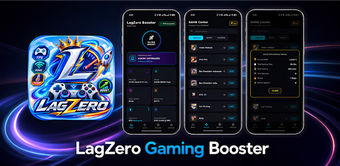
LagZero: Centralized Android gaming dashboard with ping monitoring
Organize your mobile titles and check connection quality before play with LagZero: Gaming Boost FPS, from PlayNestX. The app centralizes supported games into a single dashboard, offers a one-tap launcher, and displays real-time ping to assess Wi-Fi or mobile data before matches. It also supports favorites management and a dark-themed interface. Casual players and competitive mobile gamers gain faster access and immediate connectivity insight for match readiness.
LagZero centralizes installed games and gives upfront connectivity checks
LagZero identifies supported titles on the device and places them in a single game library, providing a unified entry point for launch and management. The tool includes a one-tap launcher, favorites pinning, and a dedicated ping monitor that reports live network latency before a session starts. Practical results are faster access to installed titles and a single view that reduces time spent hunting through separate app menus.
LagZero operates without altering game files or contacting game servers
The app is designed with a privacy-conscious approach and explicitly does not interfere with external game servers or perform unauthorized system modifications. It does not alter game files or provide cheats, and it requests only standard permissions required to detect installed apps and read network status. This behavior lowers the risk of account-related issues tied to in-app file modification.
LagZero’s design minimizes intrusive system changes while focusing on monitoring
Because the tool emphasizes organization and connection reporting rather than runtime tuning, it avoids writing into game packages or system components. The developer built the app for modern Android environments and it runs as a dashboard layer that reads application lists and network metrics. This means the app performs monitoring tasks without claiming to change in-game performance directly.
LagZero fits players who want simple management and quick session setup
The interface uses a dark theme and responsive layout intended for low-light play, with features aimed at both casual and competitive gamers. In addition, user feedback notes a clean visual design and straightforward workflows. The developer positions the app as a lightweight gaming space that reduces navigation friction and gives players an easy way to check readiness before joining matches.
Practical dashboard for gamers, with device-detection limits to note
LagZero is a practical option for mobile gamers who need a dedicated dashboard to organize titles and check connection quality before play. The main caveat is that detection and availability of supported games can vary by device and Android version, which may produce inconsistent coverage on some handsets. For players seeking a non-modifying management layer, the app is a sensible, low-risk choice with that trade-off in mind.